
StrikeScribe

    AI Note Taker for Uploaded Meetings

    Capture, summarize, and organize meeting notes from exported or recorded files — no calendar bot joins your call.

    • Guest upload — free to try with no signup
    • Upload-first workflow — no meeting bot
    • 100+ languages with searchable transcripts
    • AI summaries, actions, and scorecards

    StrikeScribe

    Meeting notes preview

    Processing
    • Speaker 100:12

      Let's lock the launch checklist before Friday.

    • Speaker 200:19

      I'll own the follow-ups and share the summary with the team.

    • Speaker 100:27

      Great — capture action items and decisions in one place.

    How it works

    From recording to searchable notes

    1. 1

      Upload or record

      Open the guest demo — free to try with no signup — then upload an audio or video file, or record live in your browser.

    2. 2

      Run transcript AI

      StrikeScribe converts speech to searchable text across 100+ languages and labels speakers when the recording supports it.

    3. 3

      Review insights

      Search the transcript, run AI insight templates for summaries and action items, then create a free account to save files.

    4. 4

      Share with your team

      Keep work in a workspace with roles for admins, editors, and viewers when you are ready to collaborate.

    Formats

    Built for real files you already have

    Upload common audio and video formats from your browser. Clear recordings with minimal background noise produce the best results.

    Supported uploads: MP3, WAV, M4A, AAC, OGG, MP4, MOV, and WebM.

    • MP3
    • WAV
    • M4A
    • AAC
    • OGG
    • MP4
    • MOV
    • WebM
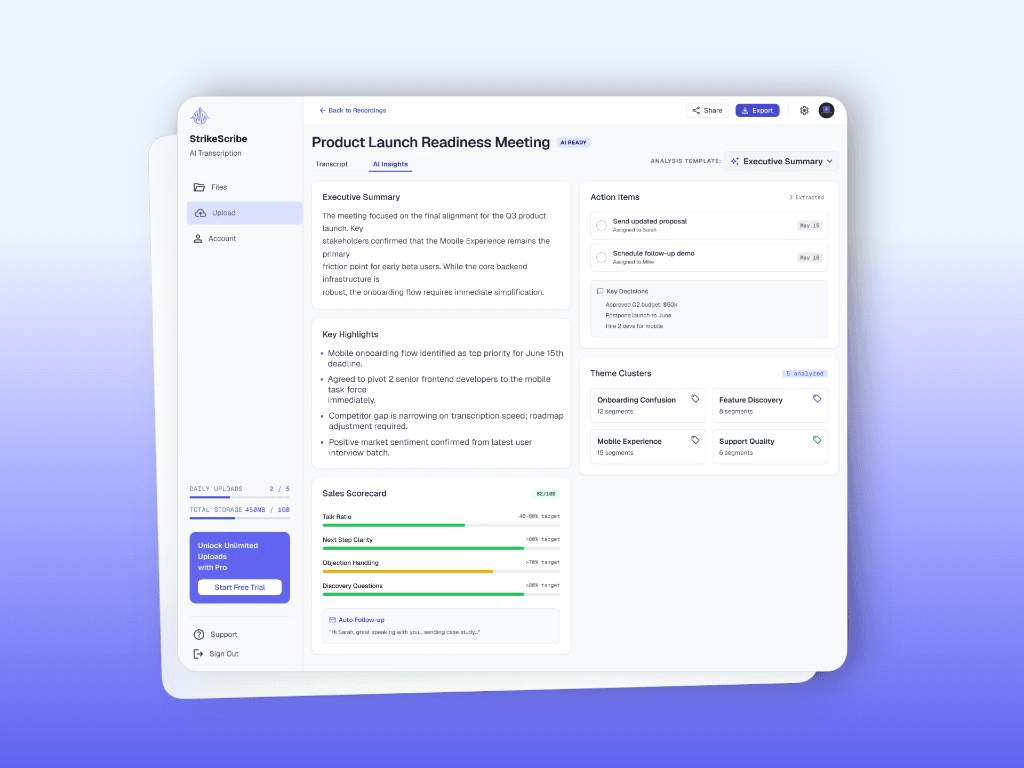
    StrikeScribe AI insights with summary and action items

    Why teams want an AI note taker without a bot

    Meeting bots add consent friction and another participant on the call. An upload-first AI note taker fits teams that already record on Zoom, Teams, Google Meet, or a local recorder and want notes afterward — not another agent in the room.

    • Summaries and action items from the same transcript
    • Search past meetings once files are saved in a workspace
    • Works with offline and sensitive meetings that should not invite bots

    From recording to organized meeting notes

    Export the meeting audio or video, open StrikeScribe’s guest demo, and upload the file. After transcription, run AI insight templates for an executive summary, highlights, and follow-ups — then create a free account when you want to keep the file.

    FAQ

    Frequently asked questions

    Try transcript AI before you sign up

    Upload audio or video in guest mode — free to try with no account. Create a free account when you want to save files and unlock your workspace.